Every screen managed at pisignage.com runs on player-month credits. One subscription year adds 12 credits to your account, which keeps one screen managed for 12 months. When your credits are about to run out, renew the subscription from the Subscription & Licenses page as described below.
Renewing in the new interface
-
Sign in to your account (https://<username>.pisignage.com) and open Subscription and License under System in the left menu. The Subscription card shows your next billing date and the credits remaining.
-
Click Renew subscription in the Subscription card. In the Renew Subscription dialog choose how you want to renew:
- Yearly - enter the number of years. Each year adds 12 credits for every paid screen on your account.
- Monthly - enter the number of months; the credits needed to run your current screens and storage for that period are added.
- Custom - enter the number of subscriptions to buy. One subscription equals 12 credits, independent of the number of screens, which is useful for topping up credits in advance.
Then click Continue to Pricing.
-
Check the Renewal Breakdown: the plan, the credits included and the total amount. For account shows the account that receives the credits; change it only if you are paying for another account, for example a client account you manage. Click Customize Invoice Details if the invoice should carry your company name, billing address or tax ID. Then click Continue to Checkout.
-
Choose a payment method: Pay with Stripe (credit or debit card), PayPal, or Pay in INR for customers in India. Complete the payment on the payment provider's page. When you are returned to pisignage.com the credits are added to your account automatically and the subscription is extended from the current expiry date.
-
Back on the Subscription & Licenses page click Refresh to see the updated credits and next billing date. The invoice for the purchase is listed under Invoice History on the same page.
Renewing in the classic interface
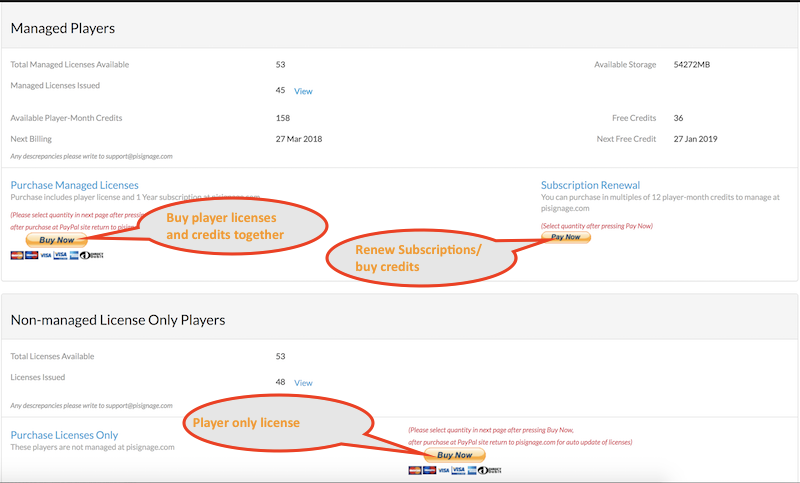
In the classic interface open Subscription/Licenses in the left menu and use the Subscription Renewal button (Pay Now). Select the quantity on the PayPal page; every player subscription purchase adds 12 credits to your account, which is sufficient to manage one player for 12 months. After the purchase at the PayPal site return to pisignage.com so the credits are updated automatically.
If the credits do not appear after payment, write to support@pisignage.com with your account name and the payment receipt.
Comments
0 comments
Please sign in to leave a comment.